What is transparent LED display used for? It brings digital content into spaces where solid screens would block views or daylight. Transparent LED panels appear on shopfront windows, glass atriums, museums, corporate lobbies, transport hubs, and event stages. A shopper might see a bright promotion floating over a display window, while the products remain visible behind it. The effect feels striking. It also depends on careful planning.
Display analyst Dr. Raymond Soneira is known for evaluating screens in real viewing conditions. A practical takeaway, paraphrased from that approach, is: “Choose for the space, not the product photo.” That matters because transparency, brightness, pixel pitch, and viewing distance all affect legibility. A panel that looks crisp in a showroom may lose contrast against a sunlit street or cluttered background. Content needs restraint, too. Large lettering and simple motion often read better through glass than dense text.
This guide explores seven practical uses, from retail advertising and architectural media to exhibitions, offices, and live events. Each setting has different goals. Some need visibility from across a plaza; others need subtle branding that preserves an open feel. Installation conditions matter. So do power, mounting, maintenance access, and the glass structure itself. A transparent display is not automatically the right choice. Sometimes a conventional screen is clearer, cheaper, or easier to maintain. The useful question is not just what it can show, but what the space needs people to notice.
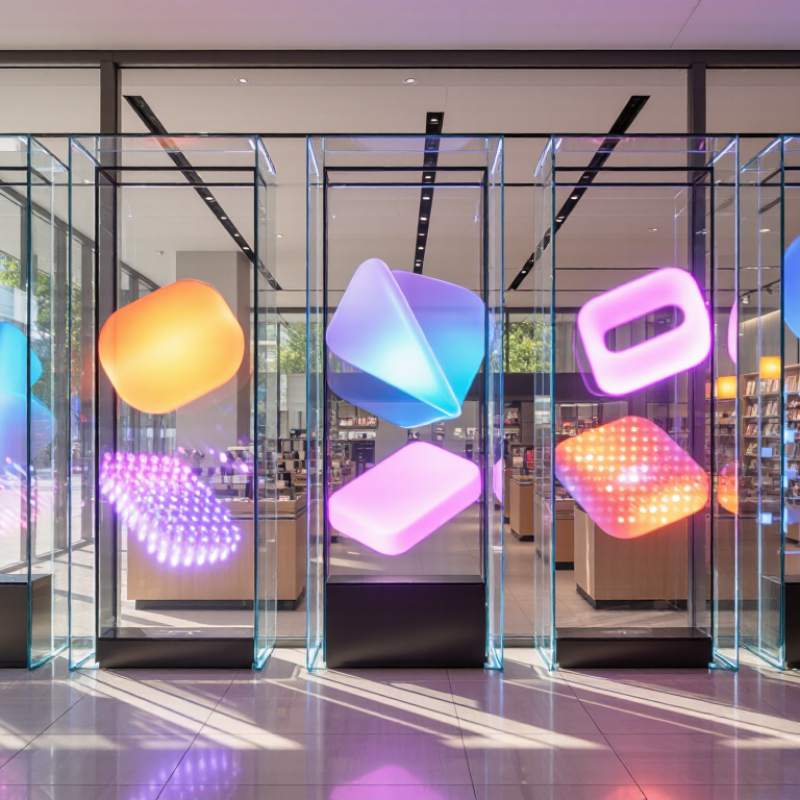
A transparent LED display uses small light-emitting diodes arranged on clear strips, a mesh, or a film-like support. The LEDs create colored pixels; the open spaces between them let viewers see through the screen. In other words, the panel itself is not fully transparent. Its visible transparency depends on pixel spacing, structure, and installation. A controller processes the video signal and adjusts each pixel’s color and brightness. More space between pixels usually improves the view through the display, but can make fine text and detail harder to see.
The effect is most useful on glass storefronts, atriums, and exhibition windows, where a screen can show moving content without fully blocking the scene behind it. A product image might appear to float over a display window. It can feel striking. It can also look washed out: direct sunlight, reflections, and viewing distance all affect readability. Brightness and pixel pitch should therefore be checked at the actual site, not just in a showroom.
Market context helps explain the interest in digital signage, though it does not prove transparent LED performance. Grand View Research estimated the global digital signage market at US$28.83 billion in 2024 in its Digital Signage Market Size, Share & Trends Analysis report. That broad category includes many display types. For transparent LED, installation details matter: glass strength, ventilation, cable routing, and power access can complicate a seemingly simple upgrade. One detail is easy to miss. The content must be designed for the background behind the screen, or the image may lose contrast.
Transparent LED displays turn retail windows into active advertising space without completely blocking the shop interior. Passersby can see sale messages, product videos, and seasonal graphics while still glimpsing shelves and displays behind the glass. That partial view matters: a window that feels like a solid screen may hide the store’s best products. In a shopping mall, transparent panels can also draw attention from several walking angles, especially near entrances and open storefronts.
The result depends on the installation. Pixel pitch, viewing distance, screen brightness, glass reflections, and daylight all affect readability. A message that looks sharp indoors may lose contrast beside a sunlit walkway. Keep text brief and test sample content at the actual viewing distance. Not every window needs motion; too much animation can compete with products and nearby signs. I would review the layout at busy times, not just in an empty shop.
Tips: Use large lettering, strong contrast, and short offers. Leave clear areas over key products, and check visibility from both sides of the mall corridor. Confirm that the mounting method suits the window and allows practical cleaning and maintenance. If the display looks impressive only in a dark showroom, rethink it.
Transparent LED displays can add moving information to office glass without hiding the space behind it. In a reception area, a screen might show visitor directions, meeting schedules, or a short company update. Staff can still see daylight and movement through the glass, though the display may reduce clarity when viewed from certain angles. It is useful, but not invisible.
In meeting rooms, transparent panels can carry presentation notes or room availability while keeping the space visually open. Content should be brief and placed carefully; dense text can compete with people and furniture behind the screen. Brightness also matters. A display that looks clear in a dim showroom may appear washed out beside a sunlit window. Test it at different times of day.
Product showrooms use transparent LED screens to add motion around physical items. A display behind a glass case might show close-up details, product features, or a simple animation while visitors examine the real object. That can create context without covering the merchandise. Keep the message focused. Too many effects can distract from the product itself, and the screen’s structure may still be noticeable up close. Installation needs planning for power, ventilation, viewing distance, and cleaning access. Some details are easy to overlook until the display is already in place.
| # | Use | Typical placement | Suitable content | Why a transparent LED display fits | Planning consideration |
|---|---|---|---|---|---|
| 1 | Reception and lobby storytelling | Glass walls, lobby partitions, or selected interior glazing | Welcome messages, office information, motion graphics, and corporate milestones | Adds changing visual information while allowing some view through the glass when content is not filling the display. | Choose content contrast and brightness for the ambient light and viewing distance in the lobby. |
| 2 | Office wayfinding and updates | Glazed corridors, elevator lobbies, and shared-area partitions | Directional guidance, room schedules, visitor notices, and event announcements | Information can be updated digitally without covering an entire glass surface with a solid panel. | Keep essential directions large, legible, and visible from the intended approach. |
| 3 | Meeting-room and collaboration displays | Glazed meeting-room fronts or shared collaboration spaces | Room availability, session titles, agendas, and company-wide messages | Makes glass a flexible information surface while retaining a degree of openness between spaces. | A transparent LED display does not provide visual privacy; use suitable blinds or other privacy measures when needed. |
| 4 | Showroom product-window advertising | Street-facing storefront or showroom windows | Product launches, promotional visuals, opening hours, and campaign messages | Digital visuals can be shown on the glass while preserving some visibility into the showroom. | Assess daylight, reflections, viewing distance, local signage rules, and the display’s required brightness. |
| 5 | Product vitrines and display cases | Glass cases, showcase fronts, and product-display partitions | Feature callouts, product specifications, diagrams, and short promotional animations | Pairs digital information with a physical product without necessarily placing an opaque screen between viewers and the item. | Check reflections, viewing angles, glass dimensions, ventilation, and access for maintenance. |
| 6 | Product demonstrations and feature highlights | Behind or beside products in a showroom or experience area | Explainer animations, labeled diagrams, usage steps, and comparison information | Content can visually complement the product while leaving parts of the display area visible. | Use concise graphics and test legibility against the actual background and lighting conditions. |
| 7 | Showroom launches and presentations | Event areas, glass-backed presentation zones, or temporary product displays | Launch visuals, presentation graphics, schedules, and event announcements | Creates a digital focal point that can integrate with a glass setting and surrounding physical displays. | Confirm sightlines, content format, installation requirements, power, and cable routing before the event. |
At live events, a transparent LED display can add motion without hiding the stage behind it. Set across a scenic backdrop or venue window, it shows schedules, live visuals, or sponsor messages while preserving sightlines. It feels airy. Its open structure also lets lighting and performers remain visible, though bright ambient light can wash out images. Test contrast from the audience’s actual viewing positions, not only from the control desk.
Exhibitions use these screens to place animated labels beside objects without building a solid visual barrier. A display near a vehicle, sculpture, or product can reveal diagrams and short captions while visitors still see the item itself. Keep the text brief and allow enough viewing time. Too much motion can compete with the exhibit, and transparent does not mean invisible: cables, frames, and reflections still need careful placement.
In museums, transparent LED displays can support layered storytelling around historic objects or architectural features. A visitor might see a simple map or timeline appear over a clear case, then look directly at the artifact. This works best when the screen adds context rather than pretending to replace close observation. It is not magic. Curators should check glare, viewing angles, accessibility, and whether the digital layer distracts from the real object. Sometimes a quieter display is better.
At airports, rail stations, and bus terminals, transparent LED displays can turn glass walls into useful information surfaces. They can show platform changes, wayfinding, or service notices while preserving some daylight and sightlines. That matters in busy concourses, where a solid screen might block views of entrances or waiting areas. Reflections and bright content can still distract travelers.
On building facades, these displays can carry event schedules, cultural announcements, or visual art without completely hiding the architecture. People inside may retain outward views, but results depend on the glass, daylight, viewing angle, and screen brightness. In public spaces, displays can share civic updates or present local work near plazas and pedestrian routes. Content should be readable at a glance and avoid competing with signs. Poor placement can make a calm plaza feel noisy.
Tips: Check visibility from several distances and in changing daylight. Keep text brief, use comfortable brightness, and confirm the glass and mounting structure can support the installation. Leave room for maintenance access. Test the display with real content before committing; attractive sample images do not always work well on-site.
Qualitative suitability ratings for common transparent-display applications
Ratings are illustrative, not measured market data. They reflect how well each setting can use a see-through display while retaining visibility through the glass or structure.
They preserve some views and daylight, but reflections and viewing angles can reduce clarity. Not invisible.
Visitor directions, meeting schedules, and short updates are easy to scan. Keep messages brief.
They can show presentation notes or room availability while keeping the space visually open. Test brightness beside sunlit windows.
They can show close-up details beside a physical item, such as a product inside a glass case. Too many effects may distract.
Check contrast from audience seats, not just the control desk. Bright ambient light can wash out images.
Yes. Short maps or timelines can add context near an artifact. They should not replace close observation.
Platform changes, directions, and service notices can appear on glass walls. Keep content readable at a glance.
Check power, ventilation, mounting support, cleaning access, and viewing distance. Some details are easy to miss.
No. Results depend on glass, daylight, viewing angles, and brightness. Test with real content on-site.
What is transparent LED display used for? It is used to present bright images, text, and video on a see-through screen, allowing people to view content while still seeing objects or spaces behind it. Its LED elements form images when illuminated, while the open structure lets light pass through. This makes transparent displays useful where a conventional solid screen could block windows, views, or natural light.
In retail, they can highlight promotions in shop windows and guide visitors through shopping malls. Offices use them for announcements, while product showrooms can display features beside the items themselves. At live events, transparent screens add visual effects without fully hiding the stage; museums can use them to layer information over exhibits. They also serve in transport hubs for passenger updates, on building facades for public-facing visuals, and in public spaces for information and event messaging. Across these settings, they combine useful communication with a more open appearance.

Xiguang Display