Outdoor LED displays face more than rain. Wind drives water into seams, dust settles behind cabinets, and summer heat pushes components harder. A clear image can turn into a dark patch after one unnoticed leak. Small details matter.
How to protect outdoor LED displays from bad weather begins with the enclosure, but it does not end there. Check cabinet seals, cable entries, drainage paths, and ventilation before storm season. Match the display’s ingress protection rating to its actual exposure; a rating is not a promise against every installation mistake. Keep vents clear, inspect seals for cracking, and look for condensation after sharp temperature changes. Do not ignore a loose connector. It may be the first warning.
No verifiable source was provided for a named expert’s direct quotation, so attributing one would be misleading. A practical, unattributed field principle is: “Protect the weak points, not just the screen.” It is easy to overlook a cable gland or a cabinet joint while focusing on the front panel. That is where maintenance can fall short. Weather protection is ongoing work, not a one-time purchase. Regular inspections and records help teams spot recurring issues, though they cannot prevent every failure. This article explores why outdoor LED displays need weather protection and which checks help them stay readable through changing conditions.
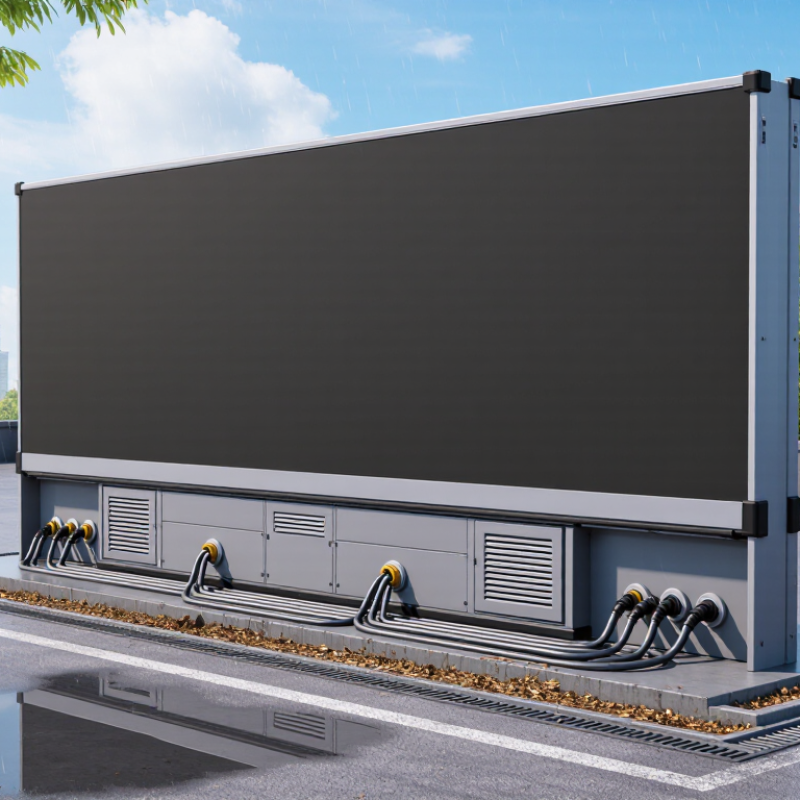
Outdoor LED displays face more than rain. Wind-driven water can enter seams, while humidity may condense inside cabinets after cool nights. Heat accelerates component aging, and direct sunlight can make dark enclosures dangerously hot. UV exposure can weaken seals and cable jackets. Coastal salt and airborne dust add further stress. Not every failure is dramatic.
The World Meteorological Organization’s State of the Global Climate 2023 report estimated global average temperature at 1.45 ± 0.12°C above the 1850–1900 average. This broader warming trend makes prolonged heat a practical design concern, though local conditions matter most.
NOAA estimates about 25 million lightning flashes occur in the United States each year. Nearby strikes can induce damaging electrical surges, even without a direct hit. Rain, temperature swings, wind, and lightning can arrive together, stressing seals, mounts, and power systems.
Tips: Check local weather extremes, not just annual averages. Specify an enclosure with a suitable IP rating, then inspect its gaskets and cable entries after installation. Keep drains clear, allow ventilation, and use surge protection. A high rating helps, but it cannot make up for poor installation or neglected maintenance.
Outdoor LED displays expose several delicate parts to rain, dust, sunlight, and repeated temperature changes. The LED modules sit closest to the weather. Their lenses and circuit boards can suffer when water enters through a damaged gasket or a poorly seated panel. Moisture may leave cloudy marks, corrode contacts, or create uneven brightness across the screen. Small gaps matter.
The cabinet can look dry outside while humid air condenses inside during a cool night. That assumption is easy to make, and not always right. Power supplies and driver boards are especially sensitive to dampness and heat. Connectors and cable glands also deserve attention; water can travel along a cable and collect at its entry point. UV exposure can make seals brittle over time, while blocked drainage may leave water sitting near the bottom of the cabinet.
Good protection depends on more than a sealed front face. Technicians should check gaskets for flattening or cracks, confirm that cable entries fit tightly, and keep drainage paths clear. Fans and vents need care too: dust buildup can restrict airflow, but sealing every opening may trap heat. A quick visual check will not reveal every problem, so inspection records and suitable environmental ratings help guide maintenance.
| Display Component | Weather Exposure | Potential Impact | Typical Protection Measure |
|---|---|---|---|
| LED modules and pixels | Rain, humidity, dust, and airborne contaminants | Moisture or dirt can contribute to corrosion, electrical faults, or uneven pixel performance. | Use modules and display enclosures designed for the installation environment; maintain seals and drainage paths. |
| Power supplies and control electronics | Water ingress, condensation, heat, and temperature changes | Conductive moisture and excessive heat can cause short circuits, corrosion, or premature component failure. | Place electronics in suitable sealed compartments and provide ventilation or thermal management appropriate to the design. |
| Cables, connectors, and cable entries | Rain, wind-driven water, UV exposure, and repeated temperature cycling | Damaged jackets or poorly sealed connections can allow water into electrical pathways and interrupt signals or power. | Use outdoor-rated cables and compatible sealed connectors; protect cable entries and check them during maintenance. |
| Cabinet seams, gaskets, and fasteners | Rain, dust, wind pressure, and seal aging | Worn or incorrectly fitted seals can create paths for water and particles to enter the cabinet. | Inspect gaskets, joints, and fasteners; replace damaged seals and keep cabinet surfaces properly aligned. |
| Optical surface and protective mask | UV radiation, dust, rain, ice, and impact from debris | Surface wear or deposits can reduce readability and may make cleaning more difficult. | Choose materials suited to outdoor exposure and clean the surface using the display maker's recommended method. |
| Cooling and drainage features | High ambient temperatures, blocked vents, and accumulated water | Poor heat removal can raise internal temperatures; blocked drainage can allow water to collect. | Keep vents and drains clear and follow the enclosure's specified installation and operating conditions. |
Note: An IP rating classifies protection against solid objects and water under defined test conditions; it does not by itself guarantee resistance to every outdoor condition or installation practice.
Rain can creep through a loose cable gland. Dust can settle on circuit boards, while salty air speeds corrosion around connectors. Moisture may also condense inside a display when warm daytime air meets a cold enclosure at night. Protection matters. IEC 60529 defines IP ratings for enclosure protection; an IP65 rating means dust-tight construction and resistance to water jets, not protection against every flood or internal condensation. Seals, drainage paths, and pressure-equalizing vents must work together. One neglected gasket can undo the rest.
Weather damage is more than cosmetic. The U.S. Federal Highway Administration estimated corrosion costs the economy $276 billion annually in its 2002 corrosion-cost study; that figure covers many industries, not LED displays specifically. NOAA reported 28 U.S. weather and climate disasters causing at least $1 billion each in 2023, with total losses near $92.9 billion. These reports show the scale of environmental stress, though they do not measure display failures directly. In practice, inspect seals and connectors after severe storms, and watch for fogging behind the front panel. It can be easy to miss. A higher IP rating helps, but installation details and regular checks still matter.
Outdoor LED displays face rain, dust, windblown grit, and sharp temperature changes. Weather protection starts with a cabinet designed to limit water and particle entry. Choose an ingress-protection rating suited to the installation, rather than assuming the highest rating is always best. A display beneath a deep canopy faces different conditions from one exposed to coastal spray. Details matter.
Gaskets around doors and seams help seal joints, while properly fitted cable glands protect entry points. Drainage channels and sloped surfaces guide rain away instead of letting it collect near connectors. Corrosion-resistant cabinet materials and protected fasteners can reduce damage from humid air and salt. Circuit boards may also have a thin conformal coating to resist moisture and dust. Still, coatings cannot make up for poor seals.
Heat is weather, too. Fans, filters, or other thermal controls must balance cooling with keeping dust and water outside. In colder regions, heaters can help limit condensation during startup; in hot sun, shade and ventilation may matter more. Access panels should remain serviceable without compromising seals after repairs. No enclosure is maintenance-free. Inspect gaskets, drains, and cable entries periodically; a small split can let water reach electronics. Installation details are easy to overlook, yet they often determine how well these features work.
Why Do Outdoor LED Displays Need Weather Protection?
Choosing protection for local conditions starts with observing the site, not picking the highest-rated enclosure. A display beside a coastal road faces salt spray and wind-driven rain. Inland, blowing dust or sudden temperature swings may be the bigger concern. In freezing areas, water can collect in seams, then expand as it turns to ice. Small details matter.
Match the enclosure and installation to those exposures. Check the manufacturer’s ingress-protection rating, but remember that a rating alone cannot predict every site condition. Sealed cable entries, covered connectors, and downward-facing drainage paths can help keep water out. In hot, sunny locations, UV-resistant materials and thoughtful ventilation matter too. A perfect seal can trap heat. That trade-off is easy to miss.
Local maintenance is part of protection. After a storm, inspect gaskets, cable glands, and the cabinet’s lower edges for looseness or standing water. Near the coast, salt deposits may need gentle cleaning before corrosion appears. Dusty sites may need more frequent filter checks. There is no single schedule that fits every climate; even a sensible inspection plan may need adjusting after the first harsh season.
Choosing the right water-jet protection helps match an enclosure to local exposure.
IEC 60529 specifies a 12.5 L/min water-jet test for IPX5 and a 100 L/min test for IPX6. Choose protection based on local conditions such as wind-driven rain and cleaning practices. These ratings describe specific tests, not a guarantee against every kind of water exposure.
LED modules, power supplies, driver boards, connectors, and cable glands need attention. Water can cause cloudy marks or uneven brightness.
Yes. Humid air may condense inside during a cool night. Looks dry. Maybe not.
Look for cracked or flattened gaskets, loose cable glands, and blocked drains. Water may collect near the lower edge.
Not necessarily. Match protection to local conditions, such as coastal spray, windblown grit, or a deep canopy.
Tight cable entries, covered connectors, and downward-facing drainage paths help. Water can travel along cables, too.
Fans and vents support cooling, but dust can restrict airflow. Sealing every opening may trap heat.
Shade and ventilation can help in strong sun. Heaters may limit condensation during cold starts.
Check it after storms, then adjust the schedule after harsh seasons. Coastal sites may need gentle salt cleaning; one plan may not fit every site.
Outdoor LED displays face constant exposure to rain, humidity, dust, wind, temperature swings, and intense sunlight. These conditions can damage cabinets, seals, connectors, power supplies, and delicate electronic components, leading to corrosion, overheating, short circuits, dim images, or unexpected downtime. Reliable weather protection helps keep moisture and debris out, supports ventilation and temperature control, and reduces wear on the display’s most vulnerable parts.
How to protect outdoor LED displays from bad weather depends on the local climate and installation site. Useful features may include sealed enclosures, appropriate ingress protection, corrosion-resistant materials, drainage, sun shielding, and suitable cooling or heating systems. Before choosing a display, consider the region’s rainfall, humidity, dust, wind, and temperature extremes. Matching protection to real site conditions can extend equipment life, maintain consistent image quality, and reduce maintenance needs.

Xiguang Display